


A clogged nozzle almost never comes out of nowhere. Something upstream — wet filament, a wrong temperature, a worn PTFE tube — pushed the printer into a jam. This guide walks through the causes in the order they actually happen, then shows you how to clear the clog and keep it from coming back.
First: Is It Really a Clog?
Check the symptom before you take anything apart.
| Symptom | Most likely cause |
| Extruder clicks or skips, no filament comes out | Hard clog in the nozzle or heat break |
| Prints start fine, then stop extruding 20–60 minutes in | Heat creep (soft filament jamming above the melt zone) |
| Extrusion gets thin, wavy, or inconsistent | Partial clog, wet filament, or wrong nozzle diameter setting |
| Filament comes out but curls sideways | Debris in the nozzle tip |
| First layer is fine, later layers are starved | Flow rate, speed, or retraction problem, not a clog |
If filament won’t come out at all, do a cold pull first (steps below). It removes most clogs in under five minutes and tells you what was stuck.
Step 1: Rule Out Wet Filament
Moisture is the single most common cause people miss.
PLA, PETG, and nylon absorb humidity from the air. When wet filament hits the hot end, the water turns to steam, the extrusion pops and stutters, and the bubbles leave carbonized residue that builds into a clog.
Signs of wet filament:
- Popping or crackling sounds while printing
- Steam or visible bubbles at the nozzle
- Rough, foamy surface on the print
- Random gaps in walls that get worse over a long print
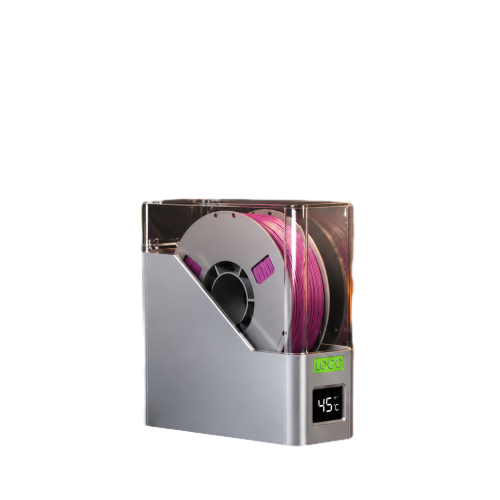
Fix it: dry the spool, then store it sealed with desiccant.
- PLA: 40–45 °C for 4–6 hours
- PETG: 60–65 °C for 4–6 hours
- Nylon: 70–80 °C for 8–12 hours
A food dehydrator or a dedicated filament dryer works. An oven does too, but only if it holds temperature accurately — most kitchen ovens swing 15 °C or more, which can soften and fuse a whole spool.
Step 2: Check Filament Quality and Diameter
Cheap filament causes clogs in three ways:
- Inconsistent diameter. The spool is labeled 1.75 mm, but sections run 1.65 mm or 1.85 mm. Thin spots slip in the extruder gears; thick spots jam in the heat break. Measure with calipers in several places — anything outside ±0.03 mm is a problem.
- Contamination. Dust, recycled regrind, and filler particles (metal powder, wood fiber, carbon fiber) wear the nozzle and collect inside it. Abrasive filaments need a hardened steel or ruby nozzle, not brass.
- Additives and pigments. Some low-cost spools contain filler that doesn’t melt at normal PLA temperatures, leaving grit that slowly blocks the orifice.
Step 3: Review Temperature, Retraction, and Speed
Temperature
Too cold: the filament doesn’t fully melt. Viscosity stays high, back pressure rises, and the extruder eventually stalls or the nozzle plugs at the tip.
Too hot: the filament carbonizes inside the melt zone and forms a hard, black deposit. This is common when the printer sits idle with the hot end at temperature for a long time.
Starting points:
- PLA: 200–215 °C
- PETG: 230–245 °C
Print a temperature tower for every new spool. The number on the box is a suggestion, not a specification.
Retraction
Retraction should pull molten plastic back just enough to stop oozing — not so far that it drags melt into the cold zone. When retraction distance is too long or the speed is too high, soft filament gets pulled into the heat break, cools there, and welds itself in place. That’s the classic “printed fine for an hour, then clogged” failure.
- Direct drive: 0.5–1.5 mm
- Bowden: 3–6 mm (some setups need more, some less — tune it)
- Retraction speed: 25–45 mm/s
PETG is far more prone to this than PLA because it stays sticky and stringy. If you’re chasing clogs on PETG, lower the retraction distance before you change anything else.
Speed and Flow
If you push volumetric flow past what the hot end can melt, pressure builds and the extruder grinds the filament. The ground-up mess then packs into the nozzle and hardens.
Rough ceilings for a standard 0.4 mm brass nozzle with a stock hot end:
- PLA: 10–15 mm³/s
- PETG: 6–10 mm³/s
If your slicer profile exceeds that, either slow down, drop layer height, or upgrade to a high-flow hot end.
Step 4: Inspect the Hardware
PTFE Tube and Heat Break
On PTFE-lined hot ends, the tube sits right against the nozzle. Above roughly 240 °C it starts to degrade: it discolors, deforms, and the inner wall goes rough. Filament catches on that roughness and sticks.
Check for:
- The tube’s end being charred, oval, or cut at an angle
- A gap between the tube and the nozzle (the #1 cause of PETG clogs on Bowden printers)
- A chewed-up inner bore you can feel with a thin wire
Fix: cut the tube square with a sharp blade, or replace it. It’s a consumable — replace it every few months on a printer that runs hot.
Nozzle Wear and Debris
Brass nozzles wear out. After long use the orifice grows oval, prints get blobby, and clogs become frequent. A worn nozzle also collects carbonized flakes from previous prints, which then act as a filter and trap new material.
Replace the nozzle when:
- The tip is visibly worn or flattened
- Print quality degrades and cleaning no longer helps
- You’ve printed a lot of abrasive material
Heat Creep
If the heat sink fan is weak, dusty, or dead, heat travels up the heat break. Filament softens before it reaches the melt zone, swells, and jams. This is the top cause of “it prints fine for 30 minutes and then stops.”
Check:
- The heat sink fan spins at full speed as soon as the hot end heats
- The fan shroud isn’t broken or blocked
- The heat sink fins aren’t caked with dust
- There’s no draft or enclosure heat soaking the extruder
First Layer and Bed Leveling
If the nozzle is too close to the bed, the first layer is over-extruded and pushed back up into the nozzle. Often this doesn’t jam immediately — it leaves residue that clogs the tip a few layers later. Adjust Z-offset until the first layer is smooth, not translucent and rippled.
How to Clear a Clog: Step by Step
Work from least invasive to most.
1. Heat and Push (Partial Clogs)
- Heat the nozzle to printing temperature.
- Manually push filament through by hand. If it comes out thin or curls, you have a partial clog.
- Raise the temperature 10–15 °C above normal and push again. Often this flushes the debris.
2. Cold Pull (Best All-Purpose Method)
- Heat the nozzle to printing temperature.
- Insert filament and push until it flows.
- Drop the temperature to 90 °C for PLA or 110 °C for PETG.
- Once it hits target, pull the filament out firmly and steadily.
- Inspect the tip. It should come out shaped like the nozzle interior, with the debris embedded in it.
- Repeat 2–3 times until the tip comes out clean.
This works for PLA, PETG, and most blends. For nylon, use the same method at a higher pull temperature.
3. Needle and Cleaning Filament
Use the acupuncture needle that came with your printer. Heat to temperature, insert from below, and work it in and out. Cleaning filament is also effective — it’s designed to grab carbon deposits and carry them out.
4. Remove the Nozzle
If nothing else works:
- Heat the hot end to 200–220 °C (never remove a cold nozzle — you’ll snap the heat break).
- Hold the heater block with pliers and unscrew the nozzle.
- Burn out the residue with a torch, or soak the nozzle in solvent, or just replace it — brass nozzles cost very little.
- Before reinstalling, make sure the PTFE tube sits flush against the nozzle, then tighten the nozzle against the tube while hot.
5. Full Hot End Service
For a stubborn clog, do a complete teardown: remove the nozzle, pull the PTFE tube, clean the heat break bore, and reassemble with the tube fully seated. This resolves cases where the clog isn’t in the nozzle at all but in the gap above it.
Prevention Checklist
- Dry every spool before use and store it sealed with desiccant
- Print a temperature tower for each new material
- Keep retraction tuned per material, especially PETG
- Stay within your hot end’s volumetric flow limit
- Replace PTFE tubing periodically on hot-running printers
- Use a hardened nozzle for abrasive filament
- Keep the heat sink fan clean and running
- Don’t leave the hot end at temperature while idle
- Re-level and re-check Z-offset after any hardware change
